

On this page12 sections
Pi is an open-source AI agent that works in your terminal. Give it a folder and a task, and it can read the files, ask a model what to do next, run commands, make changes and check the result. It can help build software, untangle an unfamiliar repository, compare data or turn a pile of notes into something useful. The coding-agent name describes where it started, rather than every job it can do.
Its particular appeal is that you can change how the agent works. A repeated request can become a slash command. A team procedure can become a skill. An extension can add a tool, change the interface or decide what information reaches the model. You can use Pi as a ready-made assistant, then alter the parts that get in your way without adopting someone else’s entire workflow.
That makes Pi worth a look if you enjoy tools you can inspect and adapt. It also creates a fair question: how much of your afternoon do you want to spend maintaining your assistant? This guide explains where Pi earns that effort, how to get started, and what you can do with it before writing a single extension.
What Pi actually brings to the desk
A model generates the responses. Pi supplies the surrounding machinery: instructions, tools, conversation history and the loop that lets the model act on its own intermediate results. That machinery is often called an agent harness.
Imagine asking it to fix a failing test. The model requests the test file; Pi reads it and returns the contents. The model asks for the implementation, proposes an edit, and requests a test run. Pi carries out those operations and returns their results. A failure can lead to another attempt; a passing test can lead to a summary and a diff for you to review. The useful change from ordinary chat is that the next response can incorporate what actually happened in the working environment. Pi’s agent-loop documentation describes this exchange.
Several different products can occupy the other positions in that arrangement:
| Part | Its job | Example decision |
|---|---|---|
| Model | Interprets the task and generates text or tool calls | Which model handles this codebase well? |
| Provider | Gives Pi access to that model | Use a supported account, API service or local endpoint |
| Pi | Builds requests, executes tools and maintains the session | Which instructions, tools and workflow should the assistant use? |
| Execution environment | Determines what the process can reach | A disposable project copy, container or controlled sandbox |
Pi is usable software, not merely a framework that requires an application around it. Its terminal interface is ready to run. Developers who do want to build an application can use its SDK or control a Pi process through RPC, a command-and-event interface between programs. Those are additional ways into the same agent machinery, rather than prerequisites for asking it to explain a function. SDK documentation.
It is also important to identify the right Pi. This guide concerns the project at pi.dev, with source in earendil-works/pi. It is not a Raspberry Pi setup guide or a guide to a different chatbot that happens to share the name.
How a deliberately small agent got here
Mario Zechner described Pi publicly in a November 30, 2025 development essay. His motivation was quite specific: he wanted more control over the context sent to models, inspectable sessions, support for different providers and a coding tool that did not keep accumulating features he did not use. The project included separate pieces for model access, the agent loop, the terminal UI and the coding-agent application.
That origin explains more about Pi than a long feature checklist does. Its small core is a design preference, not an unfinished promise to reproduce every competitor’s interface. You can add a plan workflow or delegate work to other agents, but Pi leaves those choices to extensions and packages rather than insisting that everyone use the same arrangement.
The philosophy has also evolved. The original essay argued against built-in MCP support. Pi 0.99.0 added MCP and Codemode on September 29, 2026, and Earendil announced Pi 1.0 on October 1. Current documentation therefore matters more than an old list of things Pi does not do.
The 1.0 announcement also introduced Pi Durable, an experimental package for building longer-running agent applications. It is a related project, not something you must install to use the terminal agent. Earendil describes the separation as a way to explore those applications without making the coding agent absorb every responsibility.
Who will enjoy Pi, and who may prefer something else?
Pi makes the most sense when your work already involves files and a terminal, and you have a reason to care about the assistant’s setup. Developers can use it for implementation and review. Platform engineers can adapt it to their repositories and internal tools. Researchers and technical writers can work with scripts, datasets and source notes in the same folder. People building agent products can start with the existing loop instead of recreating session management and tool execution.
Those are useful fits, not claims about who uses Pi most. The common thread is a preference for a visible, changeable workbench. If you want a different report format, you can supply it. If an operation needs a company-specific tool, there is a place to add it. If you change model providers, you can keep the surrounding workflow and evaluate what changed.
The tradeoff is that flexibility can become another project to maintain. A collection of clever extensions still needs compatible versions, understandable behavior and someone willing to fix it. For a team, “everyone has their own perfect setup” can turn into “nobody can reproduce anyone else’s problem.” A small shared configuration with a clear purpose is usually a better starting point than a package-shopping expedition.
There are good reasons to choose another tool:
- An editor-centered workflow: Cursor puts agent work alongside the code-editing experience. If seeing and reviewing changes in the editor matters more than adapting the harness, start there rather than making a terminal pretend to be an IDE.
- A more integrated coding-assistant experience: Claude Code offers terminal, IDE, desktop and browser surfaces, plus its own customization and automation features. It is a sensible comparison when you want an established product workflow around Claude. Pi is not the only customizable agent.
- Another provider-flexible agent: OpenCode is a closer comparison for people who want model choice and an open coding tool. Try the actual interaction and configuration model; “supports many providers” does not settle which one you will prefer using.
- A small, occasional question: ordinary chat may be enough. If you need an explanation of one pasted function, installing and configuring a local agent may add more work than it removes.
A fair comparison uses the same real task and includes your review time. Can you find the important decision, inspect the evidence and accept or reject the result more easily? That tells you more about an assistant’s value than how impressive its terminal looked while it was busy.
Install Pi without configuring the entire universe
Start with a disposable folder containing non-sensitive files you understand. That gives you a way to judge the first answer and makes accidental edits recoverable. Pi’s default tools can read, write, edit and run shell commands, and Pi does not request approval before every operation. If that access is too broad for the machine or repository, prepare a container or sandbox first; the isolation guide covers whole-process options.
The following path uses npm on macOS or Linux. It suits readers who already manage Node.js and makes the installed package explicit. Pi requires Node.js 22.19 or newer for this route. Check that prerequisite before installing:
node --version
npm --version
npm install -g --ignore-scripts @earendil-works/pi-coding-agent
pi --version
--ignore-scripts disables dependency lifecycle scripts; Pi’s normal npm installation does not require them. The official quickstart also offers an installer with pinned dependencies. npm does not pin every transitive dependency, so record your installed version and retain a reproducible environment if you are evaluating Pi for a team. Native Windows users should follow the Windows setup, which explains Git Bash and WSL choices, before adapting these shell examples.
Model access is separate from installation. For this first run, choose one supported hosted provider you are already authorized to use, with data-handling terms and costs suitable for the files you intend to submit. The restricted launch below disables built-in extensions, including the llama.cpp integration; local-model setup has its own path later in this guide. The first session does not need a tournament between six models.
For a clean first look, enter your disposable folder and start with reading and search tools:
cd /path/to/pi-playground
pi --no-approve --no-extensions --no-skills \
  --no-prompt-templates --no-context-files \
  --tools read,grep,find,ls
This intentionally leaves project customizations out of the experiment. --no-approve means skip trust-gated project resources, not ask for permission before every action. The tool selection is a convenience for this reading task, not an operating-system sandbox. These options are documented in the CLI reference.
In Pi, use /login to choose the provider and follow its authentication flow. Then open /model, choose an available model and press Ctrl+S in the picker to save it as the startup default. That last step matters when a later command creates a fresh session. The provider guide explains API-key and OAuth methods; /login saves credentials, so keep Pi’s authentication files private.
If your sandbox supplies a proxy credential, follow its setup instead of logging in inside it. In particular, the Docker Sandboxes instructions say to configure credentials first and not use /login in the sandbox. Package download and sign-in may need network access during preparation; you can tighten runtime access afterward.
Now ask something you can check: “Explain the files in this folder, identify the main entry point, and tell me how the documented checks are run. Do not change anything.” A useful first answer names real files and explains their relationship. You should not need to decide whether an invented architecture diagram looks plausible.
Learn the few controls you will actually use
Pi’s terminal interface shows the conversation, tool activity and an editor for your requests. Type @ to find a file to reference. A request such as “Compare @README.md with @package.json and identify setup instructions that no longer match the scripts” is more informative than “improve the docs”: the agent knows what to inspect and you know what to review.
Use /model to change models and /session to inspect session information and reported usage. /name gives a session a recognizable name. Escape stops a run; it cannot undo an operation that has already happened. The terminal guide covers these controls and the distinction between steering ongoing work and queuing a follow-up.
For ordinary coding work, start a new session with the tools the job requires. A normal pi launch enables the default read, write, edit and shell tools. In a repository you trust, that can be convenient; in an unfamiliar one, inspect its instructions and project resources before enabling them. The restricted command above is deliberately not a full coding setup.
Give Pi a concrete outcome, a scope and a way to judge the work. “Add support for millisecond values, keep the public function name, and run the unit tests” gives it a useful destination. “Make this production-ready” leaves both of you negotiating a slogan.
You do not need to specify every tool call. The reason to use an agent is that it can choose the intermediate steps. Your contribution is knowing what the work is for, which changes are acceptable and what would count as a convincing result.
Four kinds of work worth trying
The following are constructed examples. They demonstrate how to frame work and inspect an answer; they are not reports of Pi having completed these tasks.
1. Fix a small bug all the way through
Consider a Python utility that converts a duration to seconds:
def seconds(value):
    return float(value[:-1])
It handles "2s" by dropping the final character. Give it "250ms" and it tries to convert "250m" to a number. A vague request to “fix the parser” leaves too many choices open. A better request supplies the intended contract:
Update seconds(value) to accept non-negative decimal values followed
by ms or s. Allow surrounding whitespace. Reject missing units,
negative values and other suffixes with ValueError.
Preserve the function name. Add tests for 250ms, 2s, 1.5s, 0ms,
and invalid inputs. Run the tests and explain the change.
Save the function in a disposable project, give Pi its normal editing and shell tools there, and inspect the diff when it finishes. The interesting part is whether it carries the requirement through the tests. A patch that divides everything by 1,000 could fix milliseconds while quietly breaking seconds.
Here is a hand-written reference implementation for that contract:
import re

def seconds(value):
    match = re.fullmatch(r"([0-9]+(?:\.[0-9]+)?)(ms|s)", value.strip())
    if match is None:
        raise ValueError("Use a non-negative number followed by ms or s")
    number, unit = match.groups()
    return float(number) / 1000 if unit == "ms" else float(number)
The expected answers are 0.25, 2.0, 1.5 and 0.0 seconds. "2", "-1ms" and "3min" should raise ValueError. The pattern intentionally excludes scientific notation and shorthand such as .5s; if those are requirements, change the contract and tests rather than accepting whichever interpretation the model happens to choose.
This is where an agent can be more useful than a pasted code suggestion: it can inspect callers, update tests and run them in the project. Review those surrounding changes as carefully as the six-line function. A passing test that was weakened to accept the bug is not much of a victory.
2. Understand a repository before changing it
A new codebase presents a different problem. You do not yet know which file to ask about. Begin with exploration: “Trace one request from the public API entry point to storage. Name the files and functions involved, and explain where validation and retries happen. Do not edit anything.”
That request gives the reading/search tool set a purpose. Instead of producing a directory tour, the answer should follow a behavior. Open the named functions and check a couple of transitions. If a retry occurs only for a specific error, the explanation should preserve that condition.
A useful follow-up is “Which test would fail if validation were removed?” It connects architecture to executable evidence and often reveals a gap worth discussing before implementation. Pi can then help write a regression test, but you have already established what the code is meant to protect.
3. Turn source material into a useful document
Pi can also work with release notes, research notes and technical documentation. Keep the source material in a folder, then ask for an output whose claims are traceable: “Draft release notes from these change summaries. Group user-visible changes, separate fixes from breaking changes, and flag anything that needs an upgrade action. Do not infer performance improvements.”
The distinction matters. A commit saying “replace cache implementation” does not prove that a product became faster, and an internal refactor may not belong in customer-facing notes at all. A strong draft translates the change into its effect on the reader while identifying facts the source material does not settle.
For a documentation check, give Pi two versions of a setup guide and the relevant configuration examples. Ask it to identify commands, filenames and defaults that disagree, with references. That is a concrete editorial task with a reviewable outcome. It does not require a browser integration or an elaborate agent team.
4. Compare data or investigate a system
A coding agent can write and run small analysis programs, which is useful when a spreadsheet export has outgrown visual inspection. Suppose two CSV exports contain service, requests and errors. Ask Pi to join them by service, report missing services separately, and calculate error rates from the counts. Require it to show the calculation and retain the script, not just deliver a polished paragraph.
The arithmetic provides a check. In an invented example, 10 errors among 1,000 requests is 1%; 12 among 2,000 is 0.6%. Errors rose by two while the error rate fell. If the report calls that simply “worse reliability,” ask which measure it is describing. Zero requests also needs an explicit missing/undefined rate rather than a division error or a made-up zero.
The same approach applies to incident files. Give Pi sanitized deployment history, request logs and a runbook, then ask it to separate observations, hypotheses and missing evidence. A rollout at 10:00 followed by two slow requests is a lead to investigate. It does not establish a service-wide percentile or prove the deployment caused the delay. Keep the original files beside the answer so another engineer can check the references.

Read diagram description
A sanitized evidence bundle is mounted read-only. Pi reads and searches it without production credentials. Its candidate report separates cited observations, hypotheses and missing evidence. An engineer checks the claims against the original files before accepting a useful next check. Any later production action requires separate authorization and independent outcome verification.
The lesson across these jobs is broader than incident response: choose work with an inspectable output. A patch, a cited explanation, a retained analysis script or a source-backed document gives you something to accept or correct. “The agent seems busy” gives you considerably less.
Customize the repeated annoyance, not everything at once
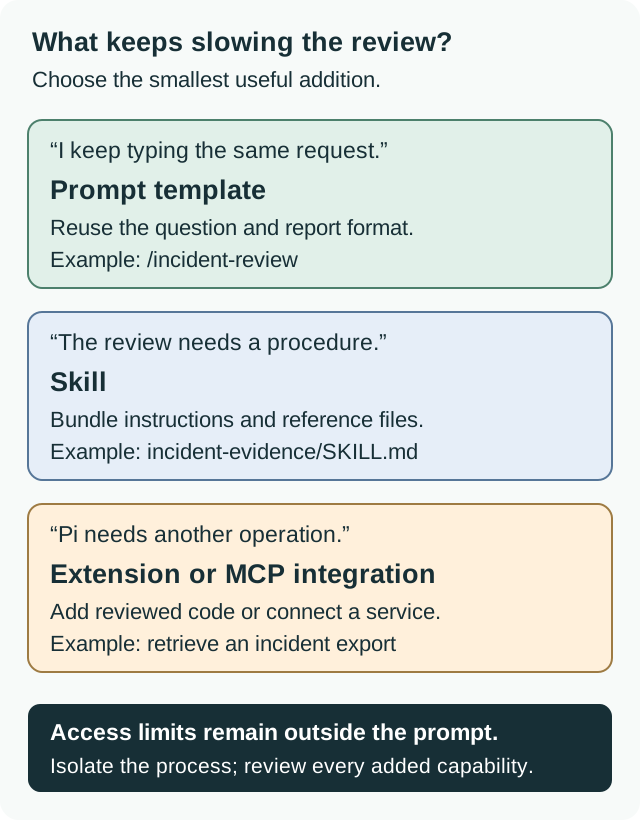
Pi’s customization options solve different problems. Start with the smallest one that removes actual effort, then move outward when the work calls for it. The terminal can remain pleasantly uneventful while you get useful work done.
Project instructions: the things that should always be known
An AGENTS.md file can explain the repository’s conventions, test commands and areas that need special care. For a small Python project, it might say:
# Project instructions
Use the existing public function names.
Run python -m unittest discover before reporting code changes complete.
Keep unit conversions explicit in function names and tests.
Do not edit generated files; update their source instead.
Write things that are true and useful across tasks. A ten-page wish list competes with the actual job for attention. Pi discovers context files in the working directory, parent directories and its user configuration; these instructions are separate from trust-gated .pi resources. Check what is being loaded when behavior surprises you. Configuration documentation.
Prompt templates: the question you are tired of typing
A template turns a Markdown file into a reusable slash command. Save this as .pi/prompts/review-change.md in a project you control:
---
description: Review a change against its intended behavior
argument-hint: "[focus]"
---
Review the current change, focusing on ${1:-correctness and tests}.
Explain the intended behavior, identify concrete risks with file references,
and distinguish a demonstrated defect from a question needing more context.
Do not modify files.
After reviewing and trusting the project’s resources, use /reload, then /review-change or /review-change "backward compatibility". The filename supplies the command name; the argument changes its focus. This is reusable text, so it does not create a new operation or enforce the “do not modify” instruction. Prompt-template guide.
If you are still using the stripped-down first-launch command, remove --no-prompt-templates and make a deliberate project-trust decision before expecting the template to appear. If the folder is mounted read-only, edit the host-side source and expose the updated files rather than asking Pi to write through the mount.
Skills: a procedure with supporting material
A skill is useful when the task needs more than a reusable paragraph: a release procedure, an analysis method, examples of the expected output or a script the agent should use. Put those together in a directory containing SKILL.md. Its name and description help Pi recognize when it applies; the detailed instructions load when needed. You can invoke a skill explicitly with /skill:name.
For example, a release-notes skill could carry the audience rules, the previous release’s format and a script that extracts the approved change summaries. That gives the task a consistent starting point without putting all that material into every coding conversation. Keep scripts reviewable and references relative to the skill directory. Skill documentation.
Extensions, MCP and packages: when the job needs new behavior
An extension is executable TypeScript inside the Pi process. It can add a tool or command, handle events, influence context and customize the terminal UI. Use one when you actually need behavior, such as fetching an approved build report or showing project-specific status. An extension that can execute arbitrary code deserves a different level of scrutiny from a paragraph of instructions. Extension guide.
MCP, the Model Context Protocol, provides another way to connect tools and data from external programs. Pi supports local servers and remote HTTP connections. Codemode lets the model compose tool calls in JavaScript, including combining and filtering results before returning them to the model. That can help with many related calls; it does not make an unsafe external operation safe. MCP guide and Codemode reference.
Pi packages bundle extensions, skills, prompts and themes for sharing through npm or Git. The package guide explains personal versus project installation and version pinning. Pin reviewed versions for a shared setup, and keep a short explanation of why each package is there. An impressive list of plugins is not a substitute for a workflow someone can understand.
Models, local use and what the bill really follows
Pi can work with multiple hosted providers, supported subscription login methods and local or compatible endpoints. That lets you separate the choice of assistant interface from the choice of model. It does not make those models interchangeable: tool use, response quality, context capacity and latency can differ substantially for the same task. Model selection.
For your first useful comparison, keep the files and task fixed. Judge whether the model found the relevant code, respected the intended behavior and produced changes you could review. A cheaper model can be a good fit for repetitive document checks and a poor fit for a difficult refactor, or the other way around on your particular repository. Measure the work rather than assigning permanent jobs from a model’s reputation.
Local inference is a separate setup choice. Pi’s llama.cpp guide describes connecting to its router server and managing available models. Your machine must have enough memory and suitable compute for the chosen model and context. Running the terminal program locally does not, by itself, mean inference is local; a hosted provider still receives the content sent in model requests.
Pi’s software is MIT-licensed, but a task can still cost money. Hosted API providers may charge for input, output, cached context and other provider-specific usage. Subscription-backed access has its own limits and terms. Local models replace a provider bill with hardware, power and maintenance costs rather than making computation disappear. Follow the actual account’s billing and terms instead of assuming every login method has the same economics.
An agent task can involve many model requests. Reading another file adds context; running a test adds output; fixing the next failure adds another turn. A long, unsuccessful investigation can therefore cost more than a short successful one even if both end with a similarly sized answer. Use /session and provider records to understand consumption, and include your time spent correcting the result. Our token-usage guide explains why a chat message is a poor unit for estimating that cost.
Sessions are useful memory, with a few catches
Pi keeps sessions as trees. /tree lets you return to an earlier point and pursue another direction, while /fork creates separate work from an earlier message. That is useful when comparing two approaches to a change: you can preserve the first discussion while exploring the second. It does not restore files to their earlier contents. Use version control or separate working copies when the alternatives involve edits.
--continue resumes the latest session for the working directory, and /resume lets you choose another. When continuing a restricted run, repeat its tool and resource flags; the fact that the conversation is old does not preserve a previous command line. Longer sessions may be compacted into summaries for later requests, while original entries remain in the saved history. A summary can lose a detail, so important requirements belong in durable project files as well as conversation. Session guide.
Exports are useful for reviewing or sharing how a result was reached. They can also contain prompts, file contents, command output and credentials accidentally exposed during work. Inspect the material before sharing it. A session is closer to a work log than a clean final report.
The safety boundary belongs around the process
The most consequential Pi setting may be what the operating system lets it reach. Its tools and extensions run with the permissions of the Pi process. A working directory is a starting location, not a fence, and a request to “stay in this folder” cannot replace filesystem permissions or network controls. Project trust controls which project resources load; it is not a general permission system for later actions. Pi security guidance.
For unfamiliar repositories or unattended work, isolate the complete process and expose only the files and services the task needs. A container with your entire home directory and cloud credentials mounted into it has retained much of the access you were trying to avoid. Whole-process isolation also covers extensions; isolating only selected tools can leave other extension code running on the host. Isolation choices.
A reading-only tool selection is useful but needs care when you add integrations. A plain --tools read,grep,find,ls does not alone remove MCP tools. The initial command in this guide disables extensions, including the built-in MCP extension. If you later enable external tools, review their actual permissions rather than assuming the old list still describes everything available. CLI tool selection.
Keep production changes separate from exploratory analysis. For a deployment, account update or other consequential action, identify the allowed target, require the appropriate approval and verify the result in the destination system. Pi can help produce the proposed change; your operational process still needs to decide when and how that change is applied. Our OpenShell guide covers one way to put explicit controls around an agent.
When an interactive habit becomes automation
Once a task is useful by hand, print mode can make it part of a script. For a reading-only review of a prepared folder, this produces the final response on standard output:
pi --no-approve --no-extensions --no-skills \
  --no-prompt-templates --no-context-files \
  --tools read,grep,find,ls --print \
  "Compare README.md with the project files. Report setup inconsistencies with file references."
Use the saved model default or explicitly select the same model for repeated evaluations. A script also needs to handle failure: in print mode, an error, an aborted response or an output-token cutoff produces a nonzero exit status. A cutoff can still leave partial text on standard output, so save the exit status with the report.
JSON mode emits events rather than promising that the final answer will match your preferred JSON schema. A failed assistant response does not by itself make JSON mode exit nonzero; inspect the events. RPC keeps a process available for commands, and an accepted prompt is not completion. Wait for agent_settled when you need the automatic work to finish. These distinctions are documented in CLI integration.
Use the SDK when you need direct programmatic control inside an application, rather than adding shell parsing around an increasingly complicated integration. Pi’s site points to OpenClaw as an integration example; that illustrates the difference between the underlying agent machinery and the much broader product someone can build around it. It does not mean installing Pi gives you OpenClaw’s messaging channels or personal-assistant features.
A sensible way to make Pi your own
Start with work you already know how to judge. Fix a small bug with a regression test, trace an unfamiliar request path, or compare documents against the files they describe. Keep the first setup simple enough that you can explain why it produced the answer it did.
If the result is useful but you keep repeating instructions, add a template. If the procedure needs reference material, make it a skill. Add code or connected services when a missing operation is the obstacle. This progression gives each customization a job, which is considerably easier to maintain than a collection assembled because every demo looked interesting.
Pi’s strongest case is the combination: a usable assistant now, with room to reshape the machinery later. Choose it because that control helps you get work done and inspect the result. You do not have to become an agent-platform maintainer to enjoy a good terminal tool.
Documentation reviewed October 14, 2026. The task prompts, parser and data examples are constructed teaching material. Pi was not installed or run for this guide, and no model performance, provider cost or production outcome was measured. The Python reference example was checked separately from Pi.
Sources & context
Sources linked in this article. Read alongside the author’s analysis; a citation does not independently verify a publisher’s claims.
- Pi’s agent-loop documentationpi.dev
- SDK documentationpi.dev
- pi.devpi.dev
- earendil-works/pigithub.com
- November 30, 2025 development essaymariozechner.at
- Pi 0.99.0 added MCP and Codemode on September 29, 2026pi.dev
- Earendil announced Pi 1.0 on October 1earendil.com
- Cursorcursor.com
- Claude Codecode.claude.com
- OpenCodeopencode.ai
- isolation guidepi.dev
- official quickstartpi.dev
- Windows setuppi.dev
- CLI referencepi.dev
- provider guidepi.dev
- Docker Sandboxes instructionspi.dev
- terminal guidepi.dev
- Configuration documentationpi.dev
- Prompt-template guidepi.dev
- Skill documentationpi.dev
- Extension guidepi.dev
- MCP guidepi.dev
- Codemode referencepi.dev
- package guidepi.dev
- Model selectionpi.dev
- llama.cpp guidepi.dev
- Session guidepi.dev
- Pi security guidancepi.dev
- CLI integrationpi.dev